What are we doing on Pinterest now for board descriptions? …because I want to clean up my boards. Maybe this is a good time for you to do a Pinterest Quickie and check out these ideas, head over to your Pinterest, and do some tweaking.
Free Printable of the most recommended ideas at the end of the post, but I highly suggest reading the post just to know where I’m coming from with this.
So there are many things we can be doing to optimize our Pinterest for Best Pinteresting Activities, but Descriptions are a really big deal through the whole thing because Pinterest is a search engine, and it uses the words in the descriptions (as well as text overlays on images and image recognition) to help determine what kind of content is there for search reasons.
Pinterest offers many places to put words, like your Profile Description, Your Board Descriptions, and Your actual Pins, and while I’d say the Pin Description is probably the most important, the Board Description provides categorical keywords which are often the things Pinterest recommends in search.
For instance, say you want a crockpot recipe. You type it in search, a plethora of options are available, but Pinterest offers other options to click such as, “Easy Crockpot Recipes,” and “Cheap Crockpot Recipes,” and “Healthy Crockpot Recipes.”
Table of Contents
Pinterest Board SEO Hot Spots
The Boards have two primary places for SEO: the Title and the Description
Title
We have always been told to use a less creative and more SEO friendly title, and that is just as important now than it has ever been with this new search feature. BUT you want to make sure your title accurately matches the crap you’re pinning to that board or you’ll lose your Pinterest Credibility which is important to be seen in their new algorithm.
Description
The top boards in these searches have relevant keywords to the title, and are rich with keywords that accurately depict what is in those boards. I think the algorithm considers this when deciding “BEST” in their searches. Plus, it’s a back-up part the algorithm looks at when determining pins to show up in people’s searches.
Pinterest Board Description Breakdown
After looking through various Pinterest Boards, I think I’ve concocted a decent template. Here are some common things people are doing in their descriptions. Most don’t have all of these, but the better ones have at least 2, and the best ones hit all 3 of these.
1. What Pins Will You Find?
PINS…
This is the basic in the most basic form. The Pins. Basically keywords of what pins you will find on that Pinterest Board in particular. Think one-word NOUNS.
So first you have the actual WHATs.
Some go broad: Tips, tricks, advice, ideas, recipes, crafts, DIY projects…
Some mix and match: Tips + Advice on…
Then you have TOPICAL WHATs
Some do a very specific keyword phrase: Social Media Marketing Tips, Easy Dinner Recipes…
2. What are people really trying to accomplish?
Pins TO …
This is basically the outcome of what you’ll get if you read these articles and look at these pins. Think VERBS.
It’s amazing the things people search if you start searching for these terms. But the best way to start is to think of TO.
Social Media Tips To…. Grow your blog, become famous, sell dope…
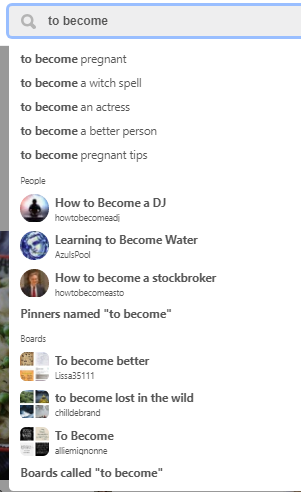
Just to show that people actually search this part of life, here’s some Pinterest Suggestions for basic thoughts…
and I find the next one just funny.
Just in case people weren’t sure how to get pregnant, you can always become water.
3. Who will benefit the most from this?
Pins to… FOR…
People are obsessed with being some identity. We mock and condemn the idea of stereotypes, but people thrive on defining themselves in categories. It’s like our brain’s way to organize people. So with that said, people search for their identities a lot.
This can be anything like entrepreneurs, infopreneurs, fempreneurs, business owners, veterinarians, artists, brides to be, moms, the graduate…
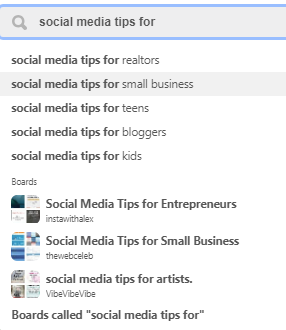
Again, you can get an idea by playing in search and seeing what Pinterest recommends, such as searching things like For.
Examples
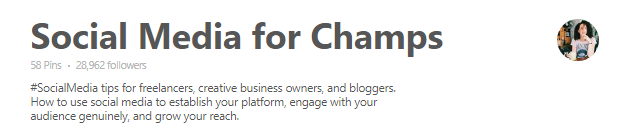
The best example I can find is from ByRegina who is one of the most amazing and inspiring people using the internet for a business. Her website design, her methods, her wording and descriptions, like she doesn’t miss a beat.
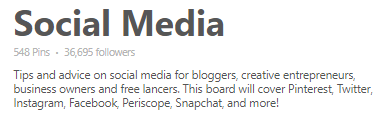
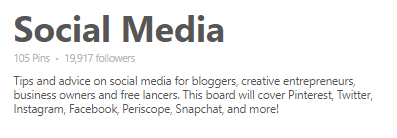
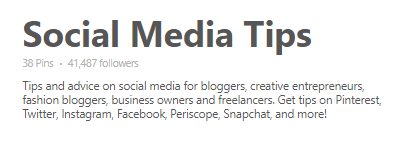
But the social media template I already see being in use because several people have the exact same wording… And NO, this isn’t the same screen clipping listed 3 times. It’s 3 different boards by 3 different people with the EXACT WORDING. You can see the pins and followers numbers are different… At least the last one made Free Lancers one word: Freelancers.
Template Ideas
This here is really the best template…
PINS TO… FOR…
But you can kind of play and mix things up… Here are some ideas, with each plus being optional.
Topic Nouns for Identities to KickAss Verbing.
Identities can KickAss Verb with these Topic Nouns
Kickass Verb with these Topic Nouns
Topic Nouns to KickAss Verb
+
This board covers List of Topics and Needs People Search
List Extra Search Phrases | Separated by symbols | Can use hearts instead
+
Group board members, please List of Rules. If you’d like to be added to this group board, please follow the board and email me@email.com.
Your Name: What You Are About On Pinterest in less than 5 words ♥ Profile Keyword | Profile Keyword | Profile Keyword ♥ website
Pinterest Board Descriptions are an integral part to the Pinterest Algorithm Experience, and the main thing is to have the keywords that people search for on Pinterest in all the places Pinterest lets you put words. You want some broad words, some narrowed, specific phrases, and some on your overall NICHE and others on the exact pin or board.
You can write it conversationally, or you can just separate keyword phrases with symbols.
And while you can read all the articles the web offers on the subject, you will learn the MOST from going on Pinterest, and playing. Search yourself. Search words that describe you. Search words that describe your board. See what other people are doing. Just like I’ve done above in this article, like if you’re doing a board on Social Media, search Social Media, look at the boards, what are their descriptions? Then search Social Media to, and look at the recommended options. Maybe check those out. Then search Social Media for, and look at the recommended options. Maybe check some of those out. But you won’t capture everything articles and tutorials are suggesting until you go on Pinterest and play with all the ways people would find you.
Free Printable
One page with the template I spoke of in this blog post to make the blogging life easier. No email signup necessary, though highly encouraged.
This website uses cookies to improve your experience. We'll assume you're ok with this, but you can opt-out if you wish. Cookie settingsACCEPT
Privacy & Cookies Policy
Privacy Overview
This website uses cookies to improve your experience while you navigate through the website. Out of these cookies, the cookies that are categorized as necessary are stored on your browser as they are essential for the working of basic functionalities of the website. We also use third-party cookies that help us analyze and understand how you use this website. These cookies will be stored in your browser only with your consent. You also have the option to opt-out of these cookies. But opting out of some of these cookies may have an effect on your browsing experience.
Necessary cookies are absolutely essential for the website to function properly. This category only includes cookies that ensures basic functionalities and security features of the website. These cookies do not store any personal information.
Any cookies that may not be particularly necessary for the website to function and is used specifically to collect user personal data via analytics, ads, other embedded contents are termed as non-necessary cookies. It is mandatory to procure user consent prior to running these cookies on your website.